MASS Storage
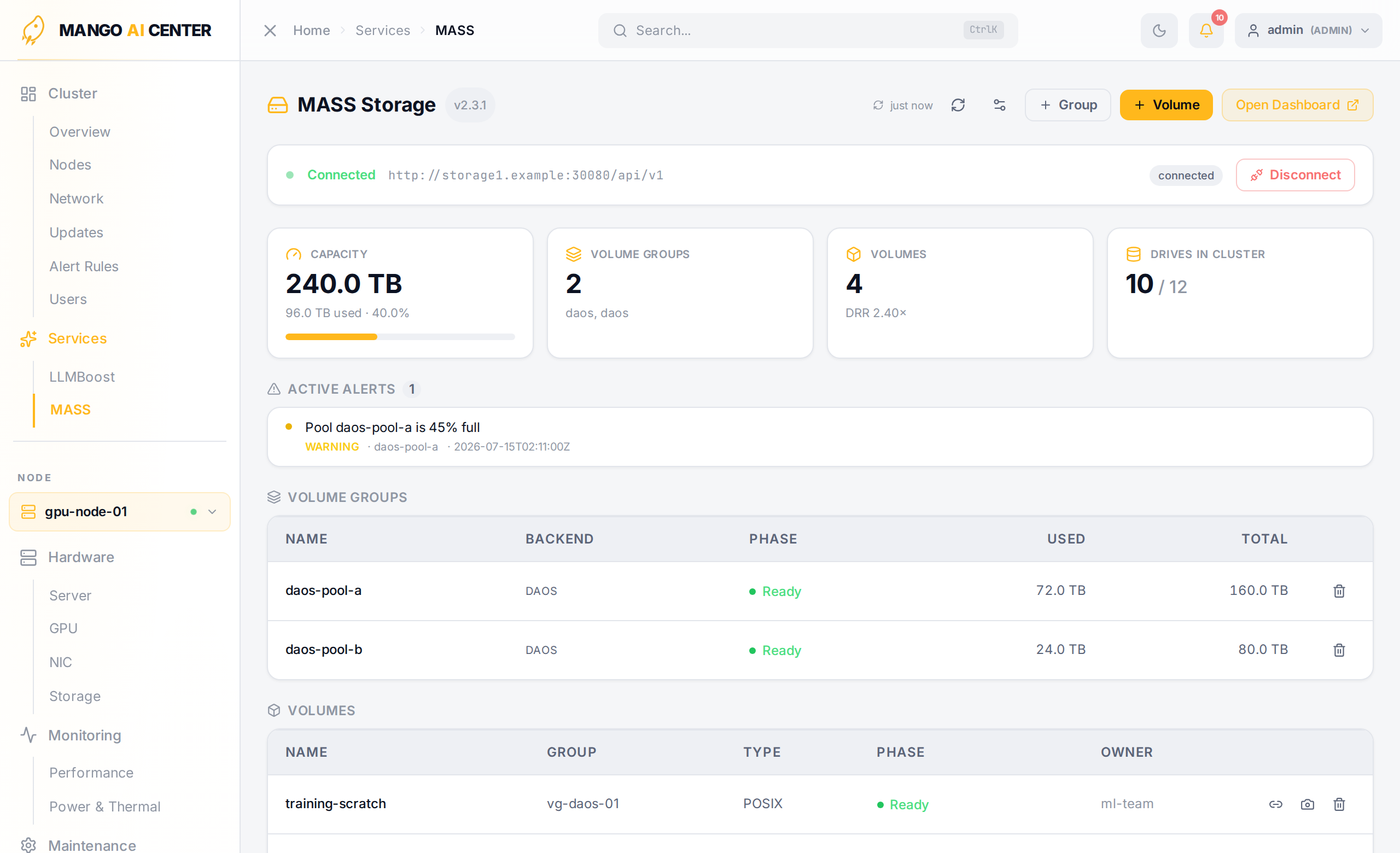
The Services → MASS page integrates a MASS (BoostX-SDS) software-defined-storage cluster into MAC. The api-server proxies the MASS Manager REST API, so MAC can view capacity, provision volumes, and wire MAC nodes into the storage fabric without leaving the dashboard.
Connecting
MASS is connected by an administrator from the connection card (or the connection
settings toggle in the header). Supply the MASS Manager API endpoint (e.g.
http://storage1.example:30080/api/v1), a username, and a password. MAC stores
the credentials on the api-server and uses them to obtain a session token (JWT) for every
subsequent call. The connectivity strip shows the live state — Not configured,
Connected, or Disconnected — along with the endpoint and a raw status
(connected / auth_failed / unreachable / …). Administrators can Disconnect to
clear the stored credentials, and an Open Dashboard link jumps to the native MASS UI.
Reads are available to any signed-in user once connected; provisioning actions require
the operator or admin role, and credential changes are admin-only.
Metric Tiles
Four tiles summarize the cluster:
- Capacity — total backend capacity, used bytes, and a usage bar
- Volume Groups — count, with the backends in use (e.g.
daos) - Volumes — count, with the overall data-reduction ratio (DRR)
- Drives in Cluster — how many discovered NVMe drives are part of the cluster, out of the total seen
Active Alerts
When MASS reports alerts, they appear as a list above the tables — severity, component, message, and time, newest first.
Volume Groups
A table of the backend storage pools: name, backend, phase, used, and total capacity. Operators can create a volume group (name, label, size, backend) or delete one (which destroys its backend pool and every volume in it).
Volumes
A table of provisioned volumes: name, parent group, type (POSIX / ANY), phase, and
owner. Operator actions per row:
- Attach to node — ensures the target node has a MASS identity, then prepares the
data-path mount and shows the exact
mountcommand to run on that node. - Create snapshot — point-in-time snapshot of the volume.
- Delete — irreversible; guarded by a confirmation dialog.
Creating a volume takes a name, a parent volume group, an owner, a size (GiB), and a type.
NVMe Drives
Every NVMe drive discovered across the MAC nodes: node, model, serial, capacity, temperature, and whether the drive is in the cluster (claimed by MASS) or still standalone.
How MAC and MASS Are Coupled
Beyond the read/provision proxy, MAC acts as an identity broker for the storage
fabric: every MAC node can be registered as a MASS principal (GET/POST
/api/v1/mass/identities), and the Attach to node flow performs the two-step
"ensure identity, then prepare the mount" orchestration in a single MAC action
(POST /api/v1/mass/attach). The mount itself runs on the node via the MASS client.
What's Not on the Page
The page reflects only what the MASS Manager API exposes. Data-path mounting happens on the node (MAC hands you the command); MAC does not run it for you.